

API & Integrations
January 13, 2026 · Last updated on March 3, 2026
Integrating HeyGen AI Videos into your LMS: A complete guide

# Learning & Development
# Integrations
Enhance your LMS with HeyGen AI video content
In this guide, we’ll walk you through how to use HeyGen with a Learning Management System (LMS), so you can deliver engaging, scalable video learning directly inside your courses.
Whether you’re building employee training, onboarding programs, compliance modules, or customer education, HeyGen makes it easy to create professional AI‑powered videos and integrate them seamlessly into your LMS. Let’s get started!
What’s covered in this guide
- What is an LMS?
- Why use HeyGen with an LMS?
- Ways to integrate HeyGen videos into an LMS
- How to embed HeyGen videos step by
- Best practices for LMS video
- Troubleshooting
- Recap
What is an LMS?
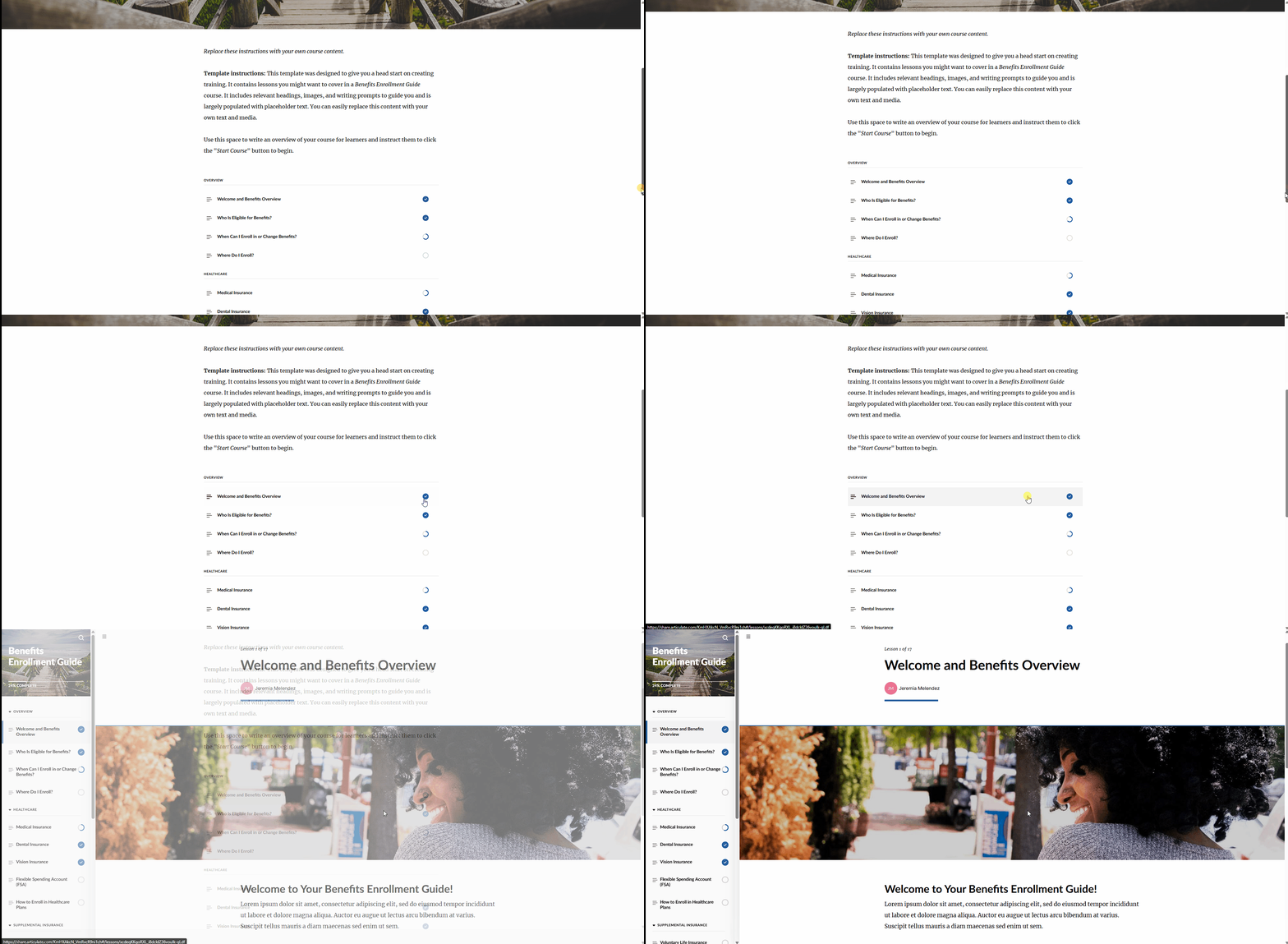
A Learning Management System (LMS) is a platform used to create, deliver, manage, and track learning content. Organizations rely on LMS platforms to centralize training, assign courses, monitor learner progress, and report on completion.
LMS platforms are commonly used for:
- Employee onboarding and enablement
- Compliance and regulatory training
- Customer education and certification
- Academic and professional learning
Most modern LMS platforms support multimedia content, making them an ideal home for video-based learning created with HeyGen.
Why use HeyGen with an LMS?
Using HeyGen with an LMS allows you to track and analyze learner progress and performance at scale. By delivering HeyGen videos through an LMS, teams can measure completion, engagement, and learning outcomes, turning video content into actionable, reportable training data.
Ways to integrate HeyGen videos into an LMS
HeyGen offers two core ways to deliver video content inside a Learning Management System, depending on your training goals, LMS Integration and SCORM Export. Both approaches allow you to use the same HeyGen videos, while giving you flexibility over how content is delivered, updated, and tracked.
LMS Integration
LMS Integration allows you to embed HeyGen videos directly into your LMS using an HTML embed code. This approach is designed for fast setup, easy updates, and seamless playback inside LMS courses.
With LMS Integration, your video stays connected to HeyGen, meaning any updates you make to the video are automatically reflected in the LMS, no re-upload required.
SCORM Export
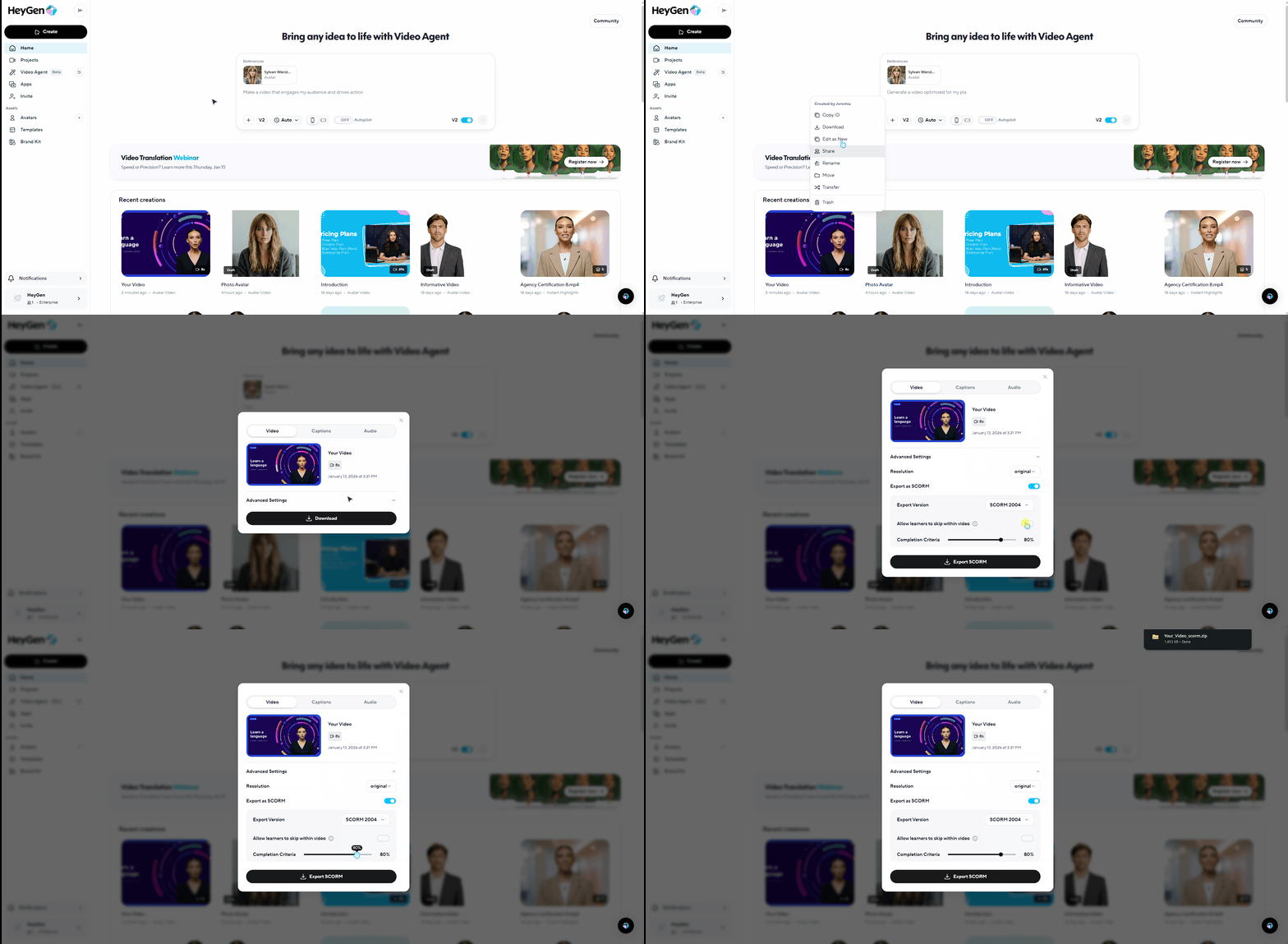
SCORM Export allows you to package HeyGen videos into SCORM compliant ZIP files that can be uploaded directly into any SCORM supported LMS. This enables standardized tracking of learner progress and completion within the LMS.
Using HeyGen’s SCORM Export feature, you can define completion rules, such as requiring learners to watch a specific percentage of the video, and ensure progress is recorded for reporting and compliance purposes.
How to embed HeyGen videos in your LMS
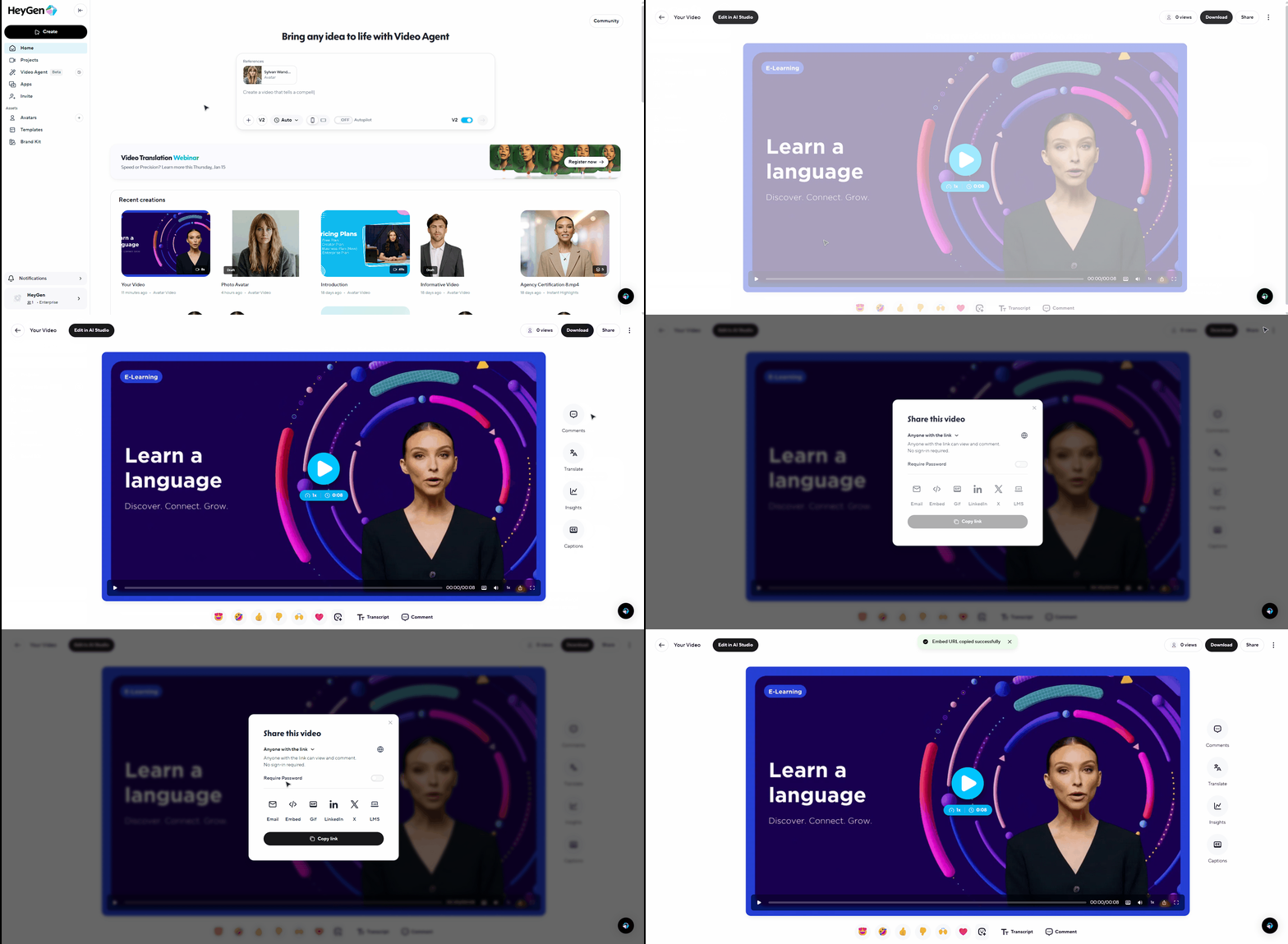
Once your video is created in HeyGen, go to the share page of the video, click share, and select LMS to copy the embed URL.
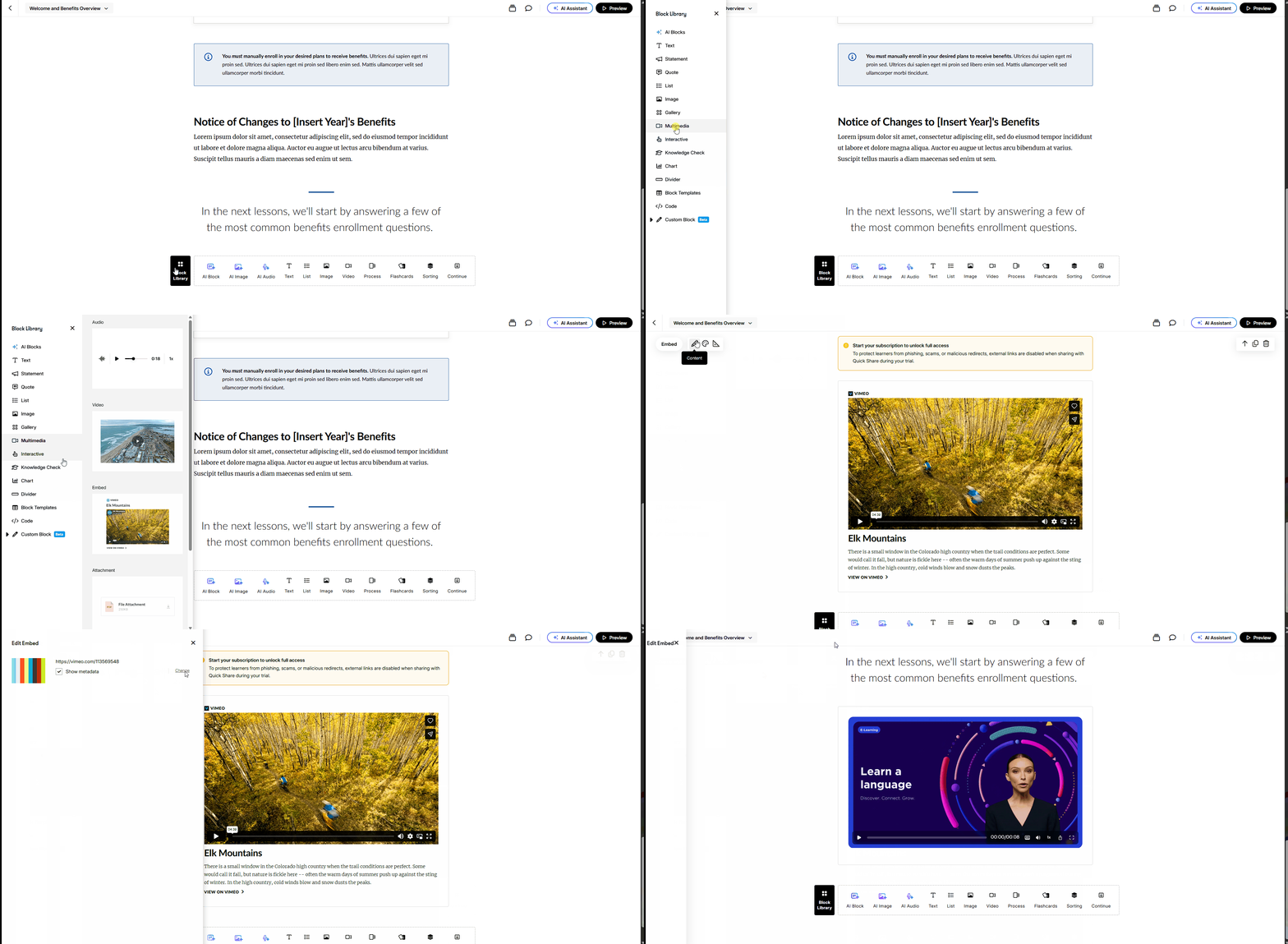
Once the embed code is copied from HeyGen, navigate to your LMS and open the course or lesson where you want the video to appear.
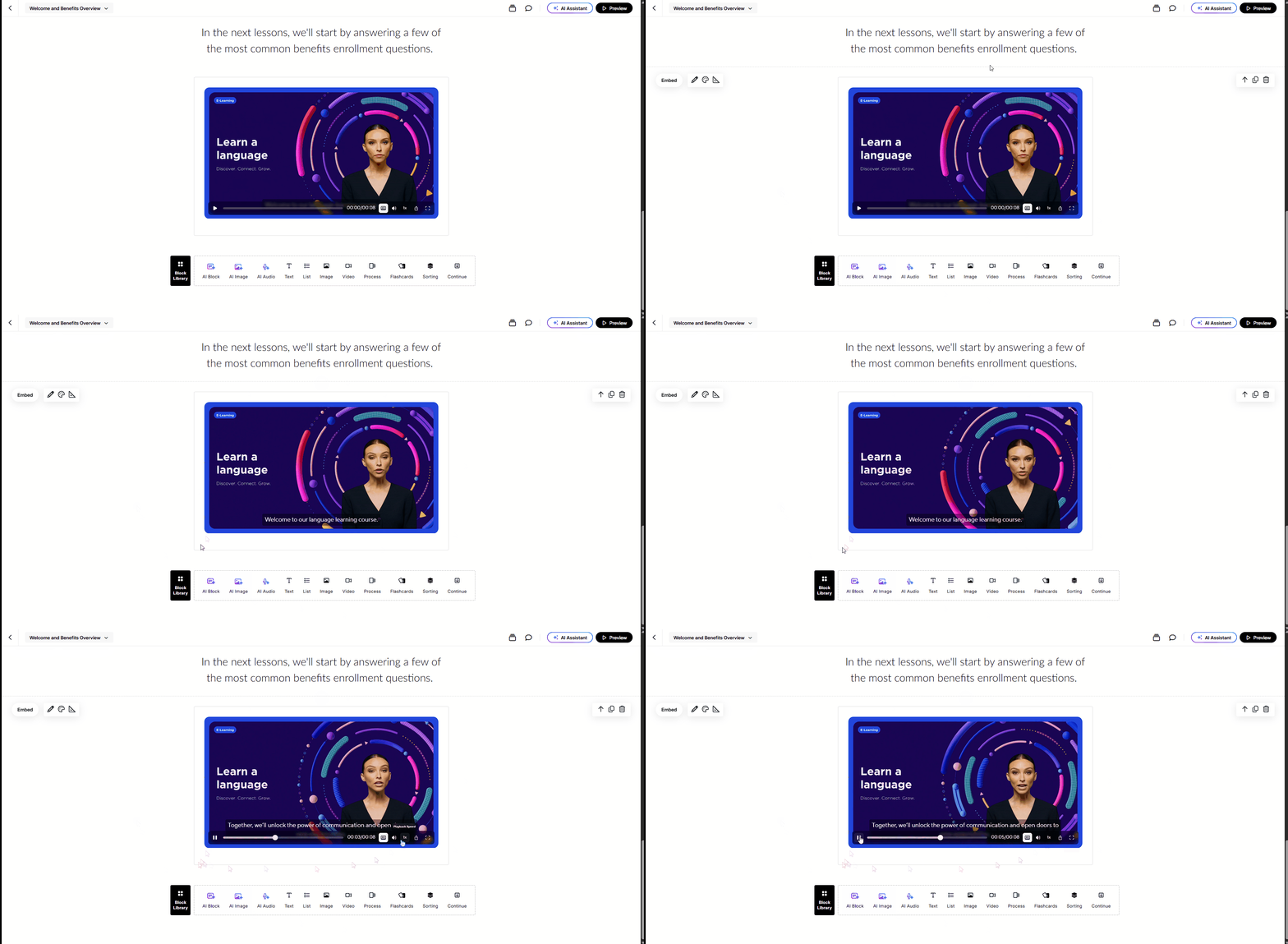
For example, in Articulate, you can add a new content block, select Multimedia, choose Embed, and paste the HTML embed code from HeyGen into the editor before saving your changes.
The video will appear instantly, fully embedded and playable directly inside the LMS, allowing learners to watch the content without leaving the course. Any updates made to the video in HeyGen will automatically be reflected in the LMS.
Best practices for LMS video learning
For the best learning experience:
- Keep HeyGen videos concise and focused, ideally under 5–7 minutes, and break longer topics into multiple videos.
- Enable captions and clear narration to support accessibility and diverse learning needs, and design content with readability in mind for both desktop and mobile learners.
- When delivering training across regions or roles, take advantage of HeyGen’s multilingual and avatar features to localize and personalize content at scale.
- To simplify maintenance, manage video versions centrally in HeyGen and rely on embeds whenever possible so updates automatically appear in your LMS without requiring rework.
Troubleshooting
Issue | Common cause | Solution |
Video won't load | iframe blocked | Use direct link or allowlist HeyGen domains |
No Audio | Network or VPN limits | Require user interaction |
Captions missing | LMS player override | Enable captions in HeyGen and LMS |
Recap
And that’s it! You’ve learned how to use HeyGen videos inside your Learning Management System to deliver engaging, scalable learning experiences.
In this guide, you learned:
- What is an LMS?
- Why use HeyGen with an LMS?
- Ways to integrate HeyGen videos into an LMS
- How to embed HeyGen videos step by
- Best practices for LMS video
- Troubleshooting
We can’t wait to see how you use HeyGen to elevate your LMS training. If you’re sharing your learning programs or success stories, tag HeyGen so we can celebrate with you!
Comment (1)
Popular

Dive in
Related
Video
Detailed tutorial on how to add products into your HeyGen avatar videos
By Gary • Jan 22nd, 2025 • Views 2.2K
Video
Detailed tutorial on how to add products into your HeyGen avatar videos
By Gary • Jan 22nd, 2025 • Views 2.2K